After completing a transaction on Bitcoin ATM , the cryptocurrency does not always appear in your wallet immediately. The same applies to sales—you may not be able to withdraw your cash until the transaction has been confirmed by the blockchain network.
This doesn't necessarily mean there's a problem with the device.
You can check the transaction status using, among other methods, TXID, information in your cryptocurrency wallet, and a blockchain explorer. It’s also worth knowing the difference between a pending transaction and a confirmed transaction, and when to contact support.
If you're just planning a transaction, you can check in advance the map at Bitcoin ATM in Switzerland and choose the right location.
What happens after a transaction is approved on Bitcoin ATM?
Once the transaction is approved, the transaction details must be transmitted to the appropriate blockchain network.
In simple terms, the process works as follows:
- The transaction is created.
- It is sent to the appropriate blockchain network.
- Awaiting confirmation.
- It is receiving further network confirmations.
- Once the required conditions are met, the transaction is executed.
When you buy cryptocurrency, the funds are sent to the wallet address provided during the transaction. If you want to learn about the entire process from the beginning, check out the guide on how to buy Bitcoin with cash at Bitcoin ATM.
When selling, the process is the opposite—the user sends cryptocurrency to the specified address, and the option to receive cash becomes available once the transaction has been confirmed.
What is a TXID?
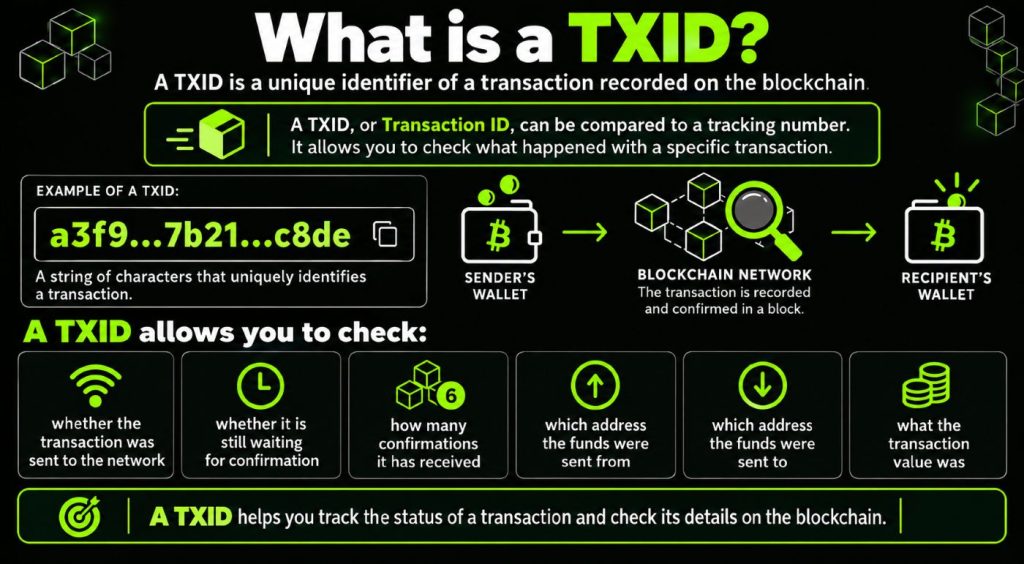
TXID, or Transaction ID, is a unique identifier for a transaction recorded on the blockchain. It can be compared to a tracking number, which allows you to check the status of a specific transaction.
Among other things, the TXID allows you to check:
- Has the transaction been sent to the network?
- Is it still awaiting confirmation?
- How many confirmations did she receive?
- From which address were the funds sent?
- To what address were they sent?
- What was the value of the transaction?
A TXID is not a password or a wallet key. The transaction ID itself can be used to check the transaction's status in a public blockchain explorer.
If you want to better understand why transactions are recorded and confirmed this way, be sure to also read the guide on what blockchain is and how it works.
Where can I find the transaction's TXID?
Where you find the TXID depends on the type of transaction you're making.
When selling cryptocurrency
If you send cryptocurrency from your wallet as part of a sale, the TXID usually appears in the wallet's transaction history after you send the funds.
Open the details of the completed transaction and look for a notation such as:
- Transaction ID
- Transaction Hash
- TXID
- Hash
When buying cryptocurrency
After purchasing cryptocurrency at Bitcoin ATM , the incoming transaction may appear in your wallet history once it has been sent to the network.
Once you open the transaction details, you can check its TXID and current status.
Some wallets also allow you to go directly to a blockchain explorer.
How do I check the status of a transaction using the TXID?
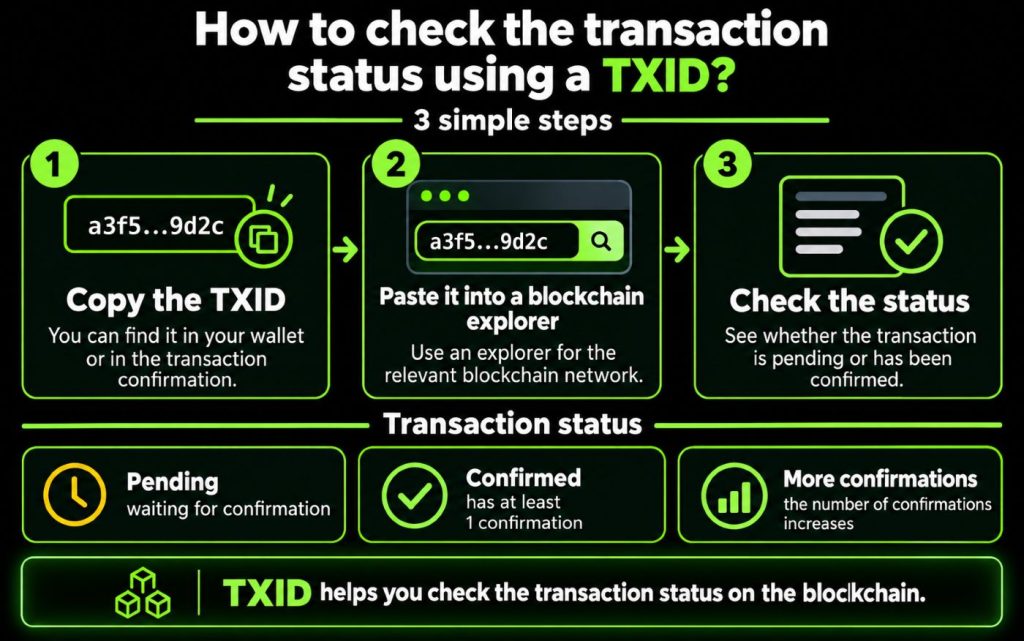
You can paste the TXID into the explorer for the relevant blockchain network.
It is important to use a block explorer that is compatible with the network on which the transaction was made. Bitcoin, Ethereum, Tron, BNB Smart Chain, and Solana all use different networks and different block explorers.
After searching for the TXID, you may see one of several statuses.
Pending transaction
This means that the transaction was sent to the network but has not yet received the required number of confirmations.
Transaction Confirmed
The blockchain network has recorded the transaction, and it has received at least one confirmation.
Further confirmations
As more blocks are added, the number of transaction confirmations increases.
For certain operations, the system may require a specific number of confirmations before it considers a transaction ready for further processing.
Why aren't there any cryptocurrencies in your portfolio yet?
Not having funds in your wallet immediately after making a purchase does not necessarily mean that the transaction failed.
Possible causes include, among others:
- waiting for the transaction to be sent to the network
- time required for blockchain confirmations
- a heavy load on a given network
- Delayed balance update in the wallet app
First, check your wallet history and transaction status.
If a TXID is available, you can also check it directly in a blockchain explorer.
What factors determine the transaction confirmation time?
There is no single holding period that is suitable for every cryptocurrency.
Speed may depend, among other things, on:
- the blockchain network used
- current grid load
- type of cryptocurrency
- the required number of confirmations
Therefore, rather than assuming that every transaction should be completed within a certain number of minutes, it is better to check its actual status.
Selling Cryptocurrency—When Can You Withdraw Cash?
When selling cryptocurrency, the funds must be sent to the address specified when creating the transaction.
Next, you must wait for the required confirmations on the blockchain.
Once the transaction has been processed successfully, the user receives a code needed to collect the cash. Keep the code until the withdrawal is complete.
At Bitcoin ATM:
- Prepare the sale transaction
- Send cryptocurrency to the specified address
- Wait for the required confirmations
- Save the withdrawal code you received
- Scan the code at Bitcoin ATM
- collect your cash
You can find the full process in the guide on how to sell cryptocurrencies and receive cash at Bitcoin ATM.
Why isn't the withdrawal code working yet?
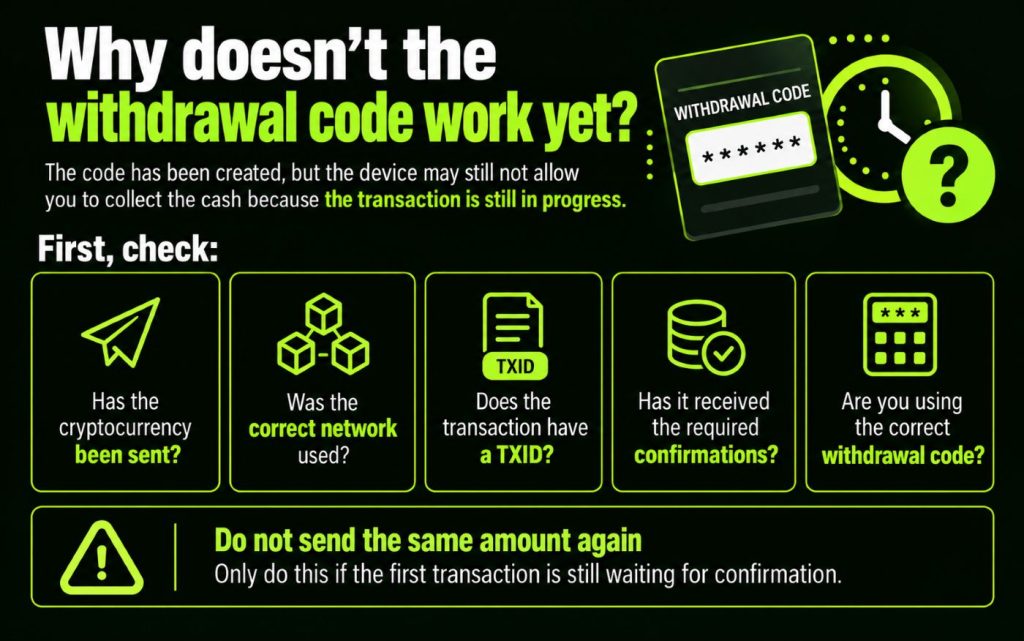
If a code has been generated but the device does not yet allow you to withdraw cash, one possible reason is that it is waiting for the required transaction steps to be completed.
First, check:
- Was the cryptocurrency actually sent?
- Was the correct network used?
- Does the transaction have a TXID?
- whether she received the required confirmations
- Are you using the correct withdrawal code?
Do not send the same amount a second time just because the first transaction is still pending confirmation.
What should you do if a transaction takes a long time?
First, check the status of the transaction in your wallet and in the appropriate blockchain explorer.
If a transaction is shown as pending, it means that it has already been sent to the network but is still awaiting confirmation.
If the situation lasts an unusually long time or the data does not match the operation performed, please contact support.
Before contacting us, please have the most important information about the transaction ready.
What information should you provide to support?
To make it easier to troubleshoot the problem, you should have the following ready:
- location Bitcoin ATM
- the approximate date and time of the transaction
- type of cryptocurrency
- the selected blockchain network
- TXID, if available
- withdrawal code or transaction confirmation, if generated
- brief description of the problem
However, do not share your recovery phrase, private key, or wallet password. This information is not needed to check the status of a transaction.
If you need help, go to the contact page and the support section Bitcoin ATM.
Does the absence of a TXID mean that the transaction failed?
Not always.
A TXID is generated only after a transaction has been created and submitted to the blockchain network.
If the transaction was just completed, the system may still be processing it. It's a good idea to first check your wallet history and the information received during the transaction.
If the TXID does not appear for an extended period of time and you do not see any change in status, please contact support.
Summary - How to Check the Status of a Transaction at Bitcoin ATM?
You can check the transaction status on Bitcoin ATM primarily by using TXID, your wallet history, and a suitable blockchain explorer. If a transaction is still pending confirmation, this does not automatically indicate a problem with your device—processing time depends, among other factors, on the selected cryptocurrency, the network, and its current load.
When selling cryptocurrency, you may not be able to withdraw cash until the required confirmations have been received. If the transaction is taking an unusually long time, it’s a good idea to have the TXID, the Bitcoin ATM URL, the transaction time, and other transaction details ready, and then contact support.
Never share your recovery phrase or private key—you don't need them to check the status of a transaction.
Frequently Asked Questions
A TXID is a unique transaction identifier on a blockchain network. It allows you to check the transaction's status, the number of confirmations, addresses, and other public information related to the transaction.
Find the TXID in your wallet and look it up in a Bitcoin network explorer. There, you'll see the current status and the number of confirmations.
Not always. The transaction may still be waiting to be sent or confirmed on the network. First, check your wallet history and the transaction's current status.
There is no single fixed time. The processing time depends, among other things, on the cryptocurrency, the blockchain network, its current load, and the required number of confirmations.
You can withdraw cash once the conditions required to confirm the transaction have been met and the withdrawal has been processed. Once you receive the appropriate code, you can use it at Bitcoin ATM.
Check to see if the transaction has been confirmed and if you're using the correct code. If the problem persists, contact support and have your transaction information ready.
No. Do not share your recovery phrase or private key with anyone. To verify a transaction, all you need is information such as the TXID, the location Bitcoin ATM, the transaction time, and the transaction details.