A Bitcoin ATM that supports USDT lets you exchange cash for Tether or sell tokens you already hold and collect banknotes. When buying, you provide your wallet address. When selling, you send USDT to the address assigned to your sell order and collect cash once it is approved.
This guide explains both types of transaction using Rothbard Bitcoin ATMs in Switzerland as an example. It covers preparing your wallet, checking the transaction breakdown and identifying the code needed at each stage.
USDT and the Swiss franc - how does the conversion work?
USDT is a stablecoin issued by Tether, designed to maintain a value close to one U.S. dollar. The peg to the USD does not imply a fixed exchange rate against the Swiss franc or a guarantee of a constant market price. Information about USDT is published by Tether.
Therefore, when exchanging USDT for CHF, the exchange rate between the dollar and the franc is also important. Even if the price of USDT remains close to one dollar, the amount received in francs may vary.
Before making a transaction, check its final result:
- When making a purchase - how much USDT you will receive for the banknotes you deposit;
- When selling - how much cash you'll receive for the amount of USDT you send;
- in both cases - which fees are already included in the transaction breakdown.
Our guide to Bitcoin ATM fees and exchange rates in Switzerland explains how to read the rate and costs. Do not add a fee again if it is already included in the exchange rate.
Before your visit, check the location and have your wallet ready
Start with the Bitcoin ATM map in Switzerland. Choose a convenient location and check the device’s operating hours. Check the operator’s current information to confirm USDT support, available networks, and the currency for deposits or withdrawals.
Before selling, also check cash availability. An open shop does not by itself mean that the Bitcoin ATM is working and has enough banknotes.
Have your ID ready. Rothbard notes that you are required to scan it during the transaction. Details on the process and verification can be found in the operator’s instructions.
You also need a wallet that supports USDT on the network available for your chosen transaction. Our guide to choosing a wallet for a Bitcoin ATM explains the basics of using wallets. For USDT, also check that the app supports the correct token and blockchain. A Bitcoin-only wallet is not sufficient.
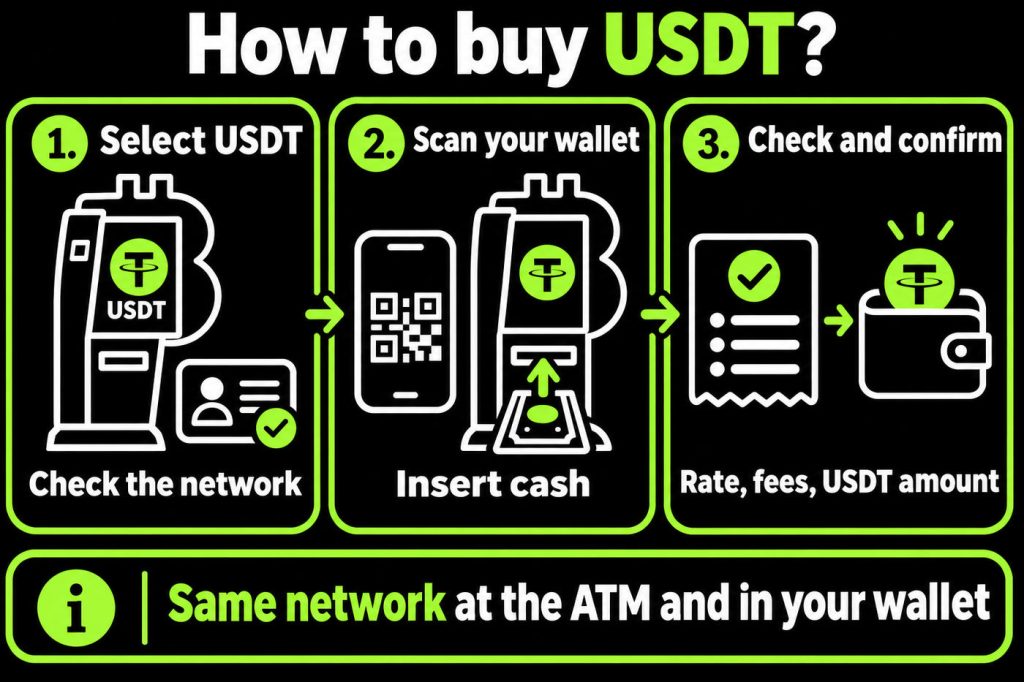
Buying USDT with cash - from banknotes to your wallet
When you buy, the Bitcoin ATM sends the tokens to the address you provide. Follow the instructions on its screen.
- Select the option to buy USDT and an available network. Open the USDT receive screen for that same network in your wallet.
- Complete the identity verification process by following the on-screen instructions.
- Scan the QR code for your receiving address. Compare the address read by the Bitcoin ATM with the address in your wallet.
- Deposit the supported banknotes and review the summary. Before confirming, verify the deposited amount, the amount of USDT, the network, the address, and the displayed fees.
- Confirm the purchase and keep the confirmation. Then check the token balance on the appropriate network.
Our guide to buying cryptocurrency with cash at a Bitcoin ATM also explains the general operation of the machine. That guide covers Bitcoin; when buying USDT, you must additionally check the token network.
Selling USDT - From Your Wallet to Cash Pickup
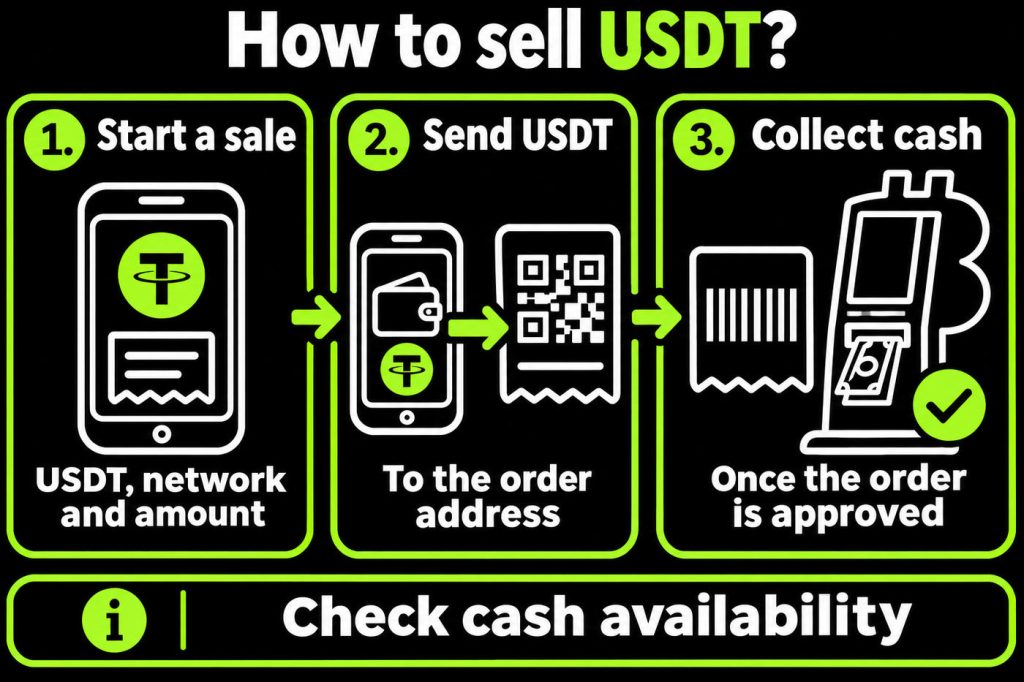
Selling requires you to send tokens to the address specified in your sell order. You can start at the Bitcoin ATM or online on the Rothbard website, then collect cash at a Bitcoin ATM in Switzerland that supports the order. The operator explains this process in its USDT selling instructions.
- Create a sell order. Select USDT, the supported network, and review the settlement terms.
- Verify the transfer details. Compare the network specified in the order with the network where you actually hold your tokens.
- Send USDT according to the order instructions. Before confirming the transaction in your wallet, check the address, amount, and transaction fee.
- Keep the confirmation and cash collection code. Check your sell order status and wait until the cash payout is ready.
- Pick up your cash at the machine. Complete the verification steps as instructed and scan the barcode for your withdrawal.
Before you go, check the opening hours and availability of banknotes again. Processing time depends, among other things, on the network and the order status.
For more on starting a transaction remotely, read our guide to selling cryptocurrency online and collecting cash at a Bitcoin ATM.
Three codes worth distinguishing
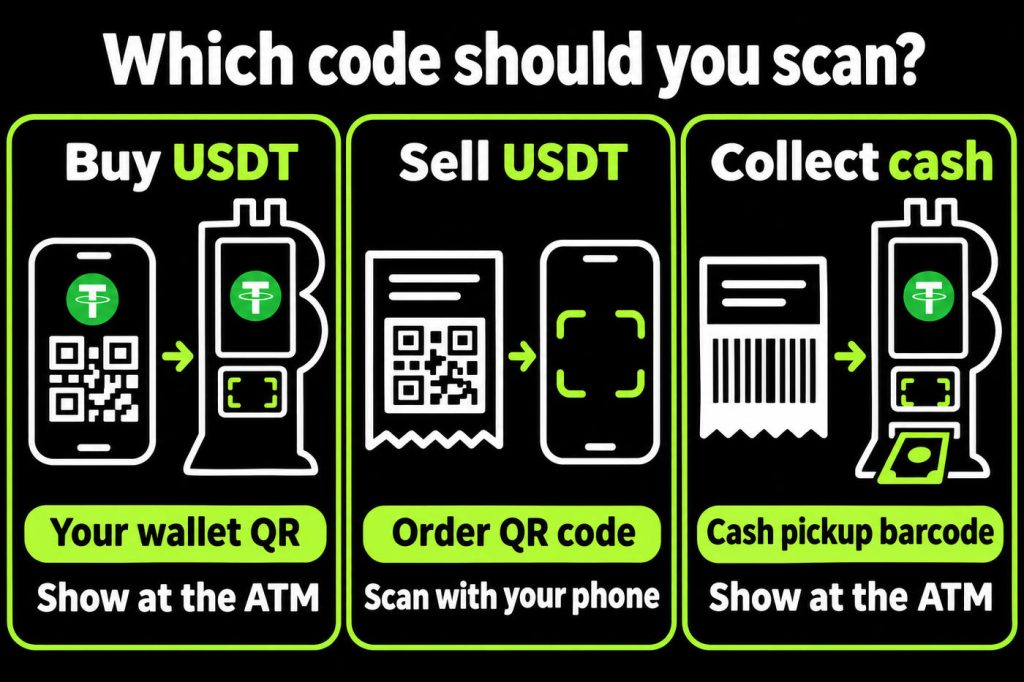
During the exchange, you may see several similar-looking codes. Each serves a different purpose.
- You provide your wallet's QR code when making a purchase. It contains the address where the purchased USDT should be sent.
- Scan the QR code for the operator's deposit address with your wallet when selling, to send USDT to the address assigned to your sell order.
- Scan the cash collection barcode at the Bitcoin ATM once your order is ready for payout.
Another identifier is the TXID, the transaction ID on the blockchain. It helps you check the transfer but does not replace your cash collection code. Keep your payout code private.
The USDT network must match on both sides
Tether operates on multiple blockchains. For example, USDT TRC20 uses the TRON network, while USDT ERC20 refers to a token on the Ethereum mainnet. Check the availability of specific networks in the selected transaction. The list of protocols is published by the issuer of USDT.
If you hold USDT on TRON, your sell order must accept USDT on that same network. Selecting Ethereum in the form does not move your tokens from TRON to Ethereum.
When making a purchase, the same rule applies to receiving funds. The network selected on your device must be supported by the address and wallet to which the funds are to be sent. Do not judge compatibility based solely on the appearance of the address.
Check that you can cover the transfer fee
Your USDT balance may not always be sufficient to make a transfer from your own wallet.
On Ethereum, network fees are settled in ETH. The TRON network uses network resources, and if these are in short supply, a fee in TRX may be charged. Before making a sale, check the fee preview in your wallet and ensure you have sufficient funds to cover it. The rules are described in the Ethereum documentation and the TRON documentation.
USDT sale calculator in CHF
Calculate your payout using the Rothbard rate and compare transfer fees on TRON and Ethereum.
Comparison of Network Fees
Enter the fees from the wallet preview in TRX, ETH, or CHF. We convert amounts in TRX and ETH using Rothbard's selling rates.
You pay the transfer fee in your wallet. Check that the network is supported by both your wallet and the Bitcoin ATM, and confirm the final amount and fees before the transaction. Rothbard exchange rate and selling conditions.
USDT sent, but cash not yet available - what should you check?
First, check the transaction in the relevant network's explorer using the TXID. Then, verify the order status with the operator.
Confirmation of the transfer on the blockchain and the availability of funds for withdrawal are two separate steps. Do not send another payment just because the banknotes are not yet available.
If the status remains unclear, keep your transaction confirmations and contact Rothbard support. Have the device’s location, date, cryptocurrency, network, and TXID ready. You can find details on how to check a transaction in the guide Bitcoin ATM Transaction Status - TXID and Confirmations.
Frequently Asked Questions
Yes. The Rothbard devices described in the guide also support USDT. Before making a transaction, confirm that the token and the selected network are available.
Yes. If the order supports the version of USDT you hold and its network, you can sell USDT without first converting it to Bitcoin.
The amount in francs depends on the current exchange rate and transaction fees. USDT is pegged to the U.S. dollar. Before sending tokens, check the final withdrawal amount.
The QR code for the deposit address is used to send USDT. To receive cash, use the withdrawal barcode, following the machine's instructions and after your order is ready.
If the transfer has not been sent, stop the process and correct the order details. If the funds have already been sent, save the TXID and contact the operator. The ability to recover the tokens depends on the specific situation and is not guaranteed.